Crypto has been popular for years, and the joke goes “one crypto year equals ten human years.” If you want to deposit New Taiwan Dollar (TWD) in Taiwan to buy digital assets, MAX is the most recommended secure exchange we feature for that use case.
This guide walks you through MAX signup, verification, and TWD deposit step by step.
👉 Sign up on MAX (referral link)
About MAX Exchange
MAX launched in 2018 under MaiCoin Group. It is Taiwan's largest exchange and among the most trusted for security and compliance, and was among the first globally to place user fiat in bank trust (TWD via Far Eastern Bank).
For investors who care about fund safety, fiat custody, and local support, MAX is the go-to choice for TWD spot trading, fee promotions, and in-person help near Taipei Metro Zhongxiao Xinsheng.
- Walk-in support: No. 104, Sec. 1, Bade Rd., Zhongzheng Dist., Taipei (Mon–Sun 12:00–20:00)
- Email: max@maicoin.com


Before you start
Residents in Taiwan can open a personal account with (per MAX’s current form):
- Mobile phone (SMS OTP)
- Primary ID (pick one)
- Taiwan nationals: Taiwan national ID
- Foreign residents in Taiwan: Taiwan ARC (Alien Resident Certificate / residence permit)
- Secondary ID: passport, NHI card, or driver license (foreigners often use a passport)
- Bank account (same legal name)
- Handheld selfie: face + ID + paper with “for MAX registration only” and date YYYY/MM/DD (see KYC below)
Foreigners: If you do not have a Taiwan national ID, select ARC / residence permit in KYC and upload ARC front/back (and handheld ARC selfie)—do not choose Taiwan national ID.
MAX registration
Use this link, the button below, or scan the QR code.
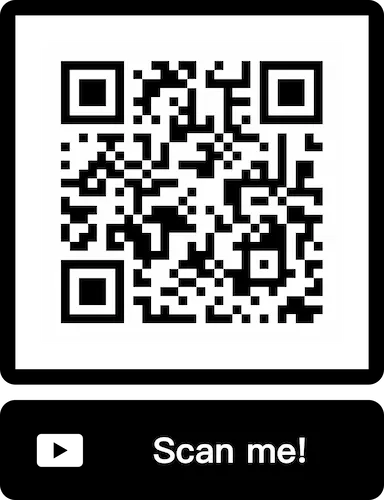
Note: If you already registered without a referral code, use 3ebf2265 for 20% fee discount for the first 6 months.
Step 1 — Sign-up form
After opening the referral link, you will see the Sign Up MAX page (with your referrer’s email shown at the top).
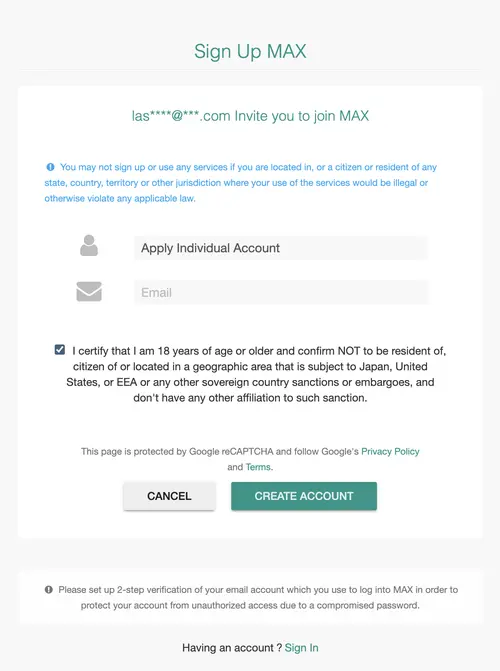
- Apply Individual Account (personal, not corporate)
- Email: use an inbox you can access for the verification code
- Certification: check the box confirming you are 18+ and not in restricted jurisdictions (Japan, US, EEA, etc.)
- Tap CREATE ACCOUNT
Step 2 — Terms (5/5)
You are signing up for a MaiCoin One account (one login for both MaiCoin and MAX). Read and check all five items, then tap NEXT.
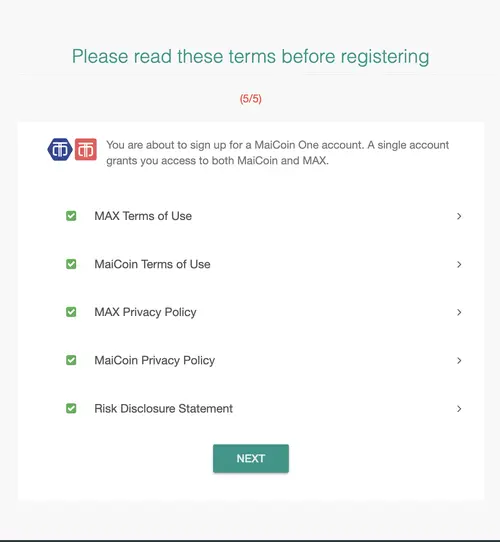
- MAX Terms of Use · MaiCoin Terms of Use
- MAX Privacy Policy · MaiCoin Privacy Policy
- Risk Disclosure Statement
Step 3 — Set password
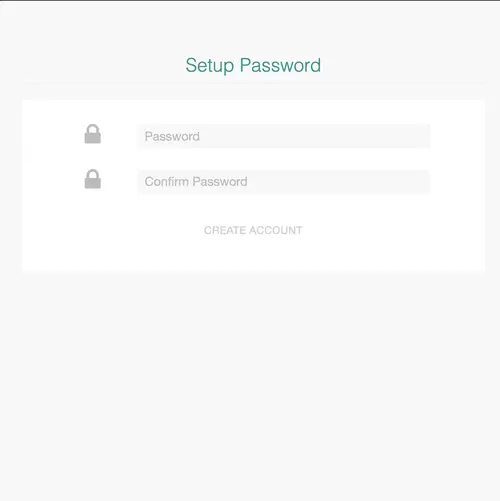
- Password: at least 8 characters with digits, lowercase and uppercase; must not contain your email or part of your UID
- Confirm Password: enter the same password again
- Tap CREATE ACCOUNT
Step 4 — Check your email
MAX sends a registration email with a 9-digit verification code, valid for 10 minutes. Do not share the code with anyone.
Step 5 — Enter the code on the website
Back in the browser, you should see “The activation code has been sent to your email.” Enter the 9-digit code and tap Verify. Use Resend if you did not receive it.
MAX: KYC verification
After the code is accepted, you land on the Member Type page. A green banner should say your account has been activated.
(Switch to Traditional Chinese via the globe icon top-right if you prefer.)
Step 1 — Lv1 vs Lv2
The page lists Lv.1 and Lv.2: features on the left, verification items on the right (green checkmarks = done, Set Up = still required).
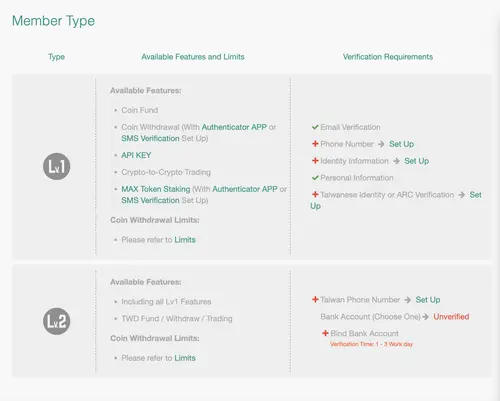
- Lv.1: after email, phone, identity, and secondary ID checks — crypto deposit, spot trading, etc. (some actions need Authenticator app or SMS)
- Lv.2: add a Taiwan mobile number and bank account (review about 1–3 business days) for TWD deposit, withdrawal, and trading
Summary (details on MAX may change):
| Item | Level 1 (Lv1) | Level 2 (Lv2) |
|---|---|---|
| Verification | Phone, email, ID, secondary ID | Bank account |
| Access | Crypto deposit | Crypto deposit + TWD fiat deposit |
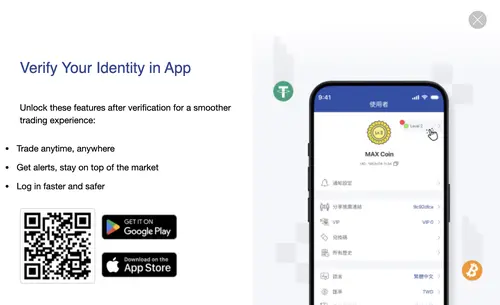
We recommend installing the MAX app to complete identity verification on your phone (trade on the go, alerts, safer login).
Step 2 — Phone verification
Under Lv.1, tap Set Up next to Phone Number. Country Taiwan, enter your mobile, Get verification code, then enter the SMS code.
Step 3 — Basic info and ID type
Tap Set Up for Identity Information or Taiwanese Identity or ARC Verification.
- Taiwan nationals: Taiwan national ID
- Foreign residents in Taiwan: Taiwan ARC (residence permit) — do not select Taiwan national ID
Optional: e-invoice carrier if you use one.
Step 4 — Upload documents
Identity verification usually needs four photos:
Taiwan nationals (Taiwan national ID):
- Handheld Taiwan national ID selfie
- ID front · 3. ID back · 4. Secondary ID
Foreign residents in Taiwan (Taiwan ARC):
- Handheld ARC selfie · 2. ARC front · 3. ARC back · 4. Secondary ID (often passport)
Selfie rules: clear face and ID fields; hold unsigned paper with text for MAX registration only and date (YYYY/MM/DD); have someone else take the photo.
Step 5 — Wait for Lv1 review
After upload, MAX confirms receipt. You can start bank verification while Lv1 is pending; MAX will email when you can proceed to Lv2.
MAX: Bank binding
On the same Member Type page, scroll to Lv.2 and tap Bind Bank Account (or Set Up next to bank account). MAX may approve Lv1 before Lv2, but you can submit bank details early.
MAX sends NT$1 to your account to verify ownership (about 3–5 business days, often faster). When ID and bank checks pass, your tier shows Lv2 and TWD deposit is enabled.
MAX: TWD deposit
You need Lv2 (including verified bank account) before depositing TWD.
- Log in to MAX (web or app) → Wallet
- Select TWD → Deposit
- Transfer only from your verified bank account via online banking or ATM
- Far Eastern Bank users may set up a designated account to save fees on larger transfers
You are done with MAX onboarding — invest responsibly.